




Our Verdict
Pros
- Thunderbolt 5 and USB 80Gbps connectivity
- Portable
- Powerful
- Cool temperatures
Cons
- None
Should you buy it?
AvoidConsiderShortlistBuyIntroduction & Drive Details
The TERRAMASTER D1 is a premium, professional product, and if you demand the very best in portable and highly compatible storage, then this is it. This premium enclosure with its dual Thunderbolt 5 and USB interface delivers lightning-fast speeds of up to 7,000MB/s. The D1 SSD Pro is natively compatible with Thunderbolt 5/4/3, USB4, and USB 3.2/3.1/3.0, connecting seamlessly to MacBook, Windows laptops, and Linux hosts. When formatted as exFat, the D1 SSD Pro offers comprehensive compatibility with macOS, Windows, and Linux for efficient cross-platform collaboration. Note that its highest throughput will come via Apple hardware.
This substantial, solid aluminum M.2 NVMe enclosure can facilitate up to 8TB in storage capacity in a reasonably compact design with zero noise operation, thereby maintaining a distraction-free environment. The D1 SSD Pro features a smart diagnostic indicator for intuitive "visual diagnostics," automatically identifying the connected protocol status:
- White Light: Connected via Thunderbolt 5/4/3 or USB4 for peak performance
- Orange Light: Connected via USB 3.2 or below for standard speeds

The D1 SSD Pro features a full aluminum body that acts as an efficient heatsink, rapidly absorbing and dissipating heat. Even under heavy, sustained loads such as large file transfers, video editing, or backups, its solid aluminum cooling surface sustains an ideal temperature range, fully preventing thermal throttling. No matter how hard we tried, we could hardly get this device warm, let alone hot. We never exceeded 40 °C with our super-efficient Samsung 9100 Pro 8TB SSD running at sustained Thunderbolt 5 speeds. Impressive.

TERRAMASTER includes an 80Gbps cable with the enclosure, along with a really nice, padded travel case to keep everything in order. The case offers protection from scratches or spills, but as we see things, it mostly offers protection for other objects, as this bulletproof solid aluminum enclosure will be dishing out damage, not taking any.

As mentioned, for our testing purposes, we chose to populate our D1 SSD Pro enclosure with an 8TB Samsung 9100 Pro, allowing us maximum speed and superior thermal characteristics.
Drive Details
| Item | Details |
|---|---|
| Model | Terramaster D1 SSD Pro |
| MSRP | $250 |
| Model Number | D1-SSD-Pro |
| Interface | Thunderbolt/USB |
| Form Factor | Rugged Portable |
| Performance | Up to 7,000 MB/s |
| Warranty | 2-Years Limited |
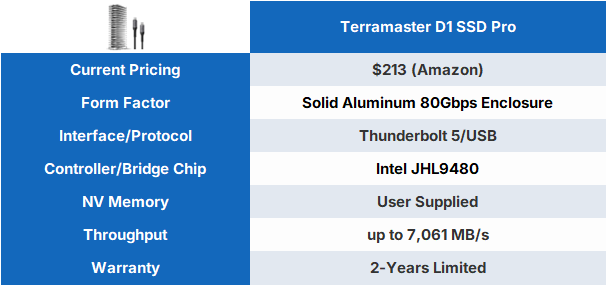


When you buy a TERRAMASTER device, you get the value-added bonus of free software, enabling you to get the most out of your storage solution with easy-to-use tools, including the TPC Backupper PC backup tool. Click HERE to download it from the D1 SSD Pro product page.
Our Latest Enclosures/Externals Review Coverage
- Orico K20 Mini 2TB Magnetic Portable SSD Review - Ultra-Thin MagSafe Drive
- LaCie Rugged SSD4 2TB Portable SSD Review - 4000 MB/s of Awesome
- Seagate Ultra Compact SSD 2TB Review - A Pocket's Best Friend
- Corsair EX400U 2TB Portable SSD Review - World's Fastest Native USB Storage
- LaCie Rugged SSD Pro5 2TB - A First of its Kind Masterpiece
Note: Performance will vary based on what SSDs are employed by the end user.

| Today | 7 days ago | 30 days ago | ||
|---|---|---|---|---|
 | $249.99 USD | $212.49 USD | ||
 | - | $199.99 USD | ||
| $339.99 CAD | $339.99 CAD | ||
| - | - | ||
| $249.99 USD | $212.49 USD | ||
 | Check Price | Check Price | ||
* Prices last scanned 5/16/2026 at 7:11 am CDT - prices may be inaccurate. As an Amazon Associate, we earn from qualifying purchases. We earn affiliate commission from any Newegg or PCCG sales. | ||||
Synthetic Benchmarks: CDM, ATTO & Blackmagic
CrystalDiskMark
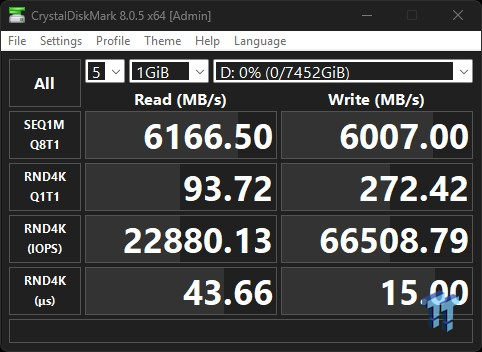
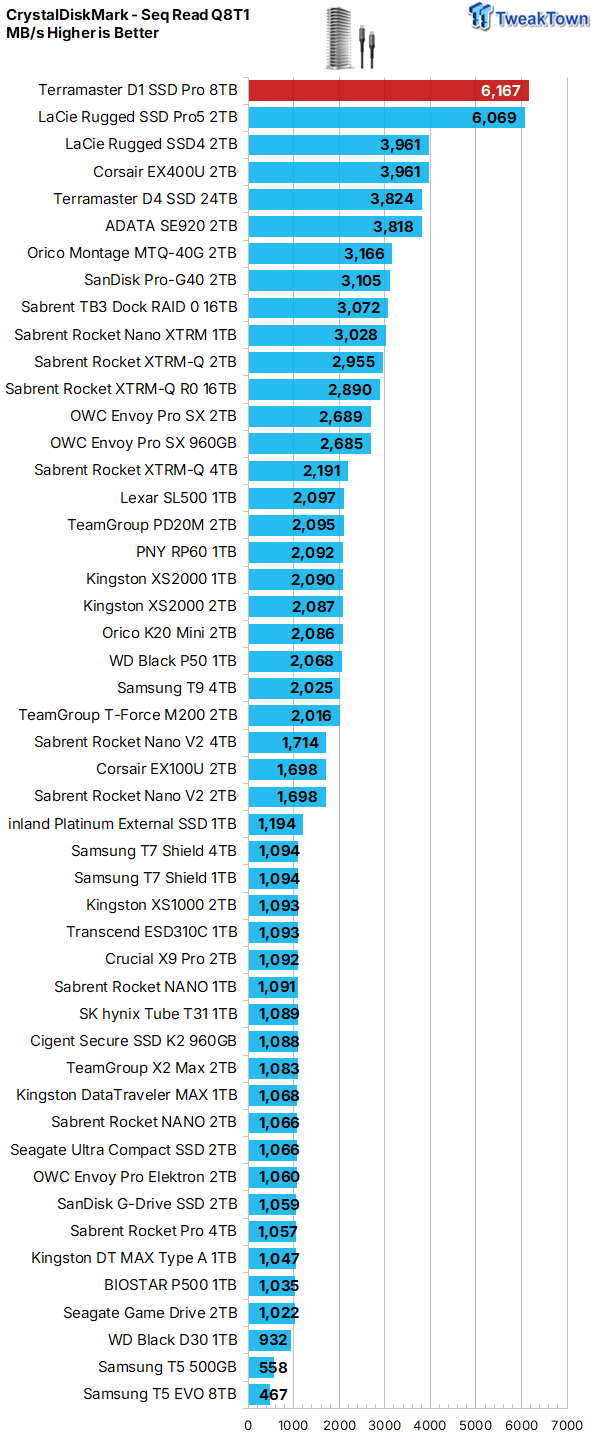
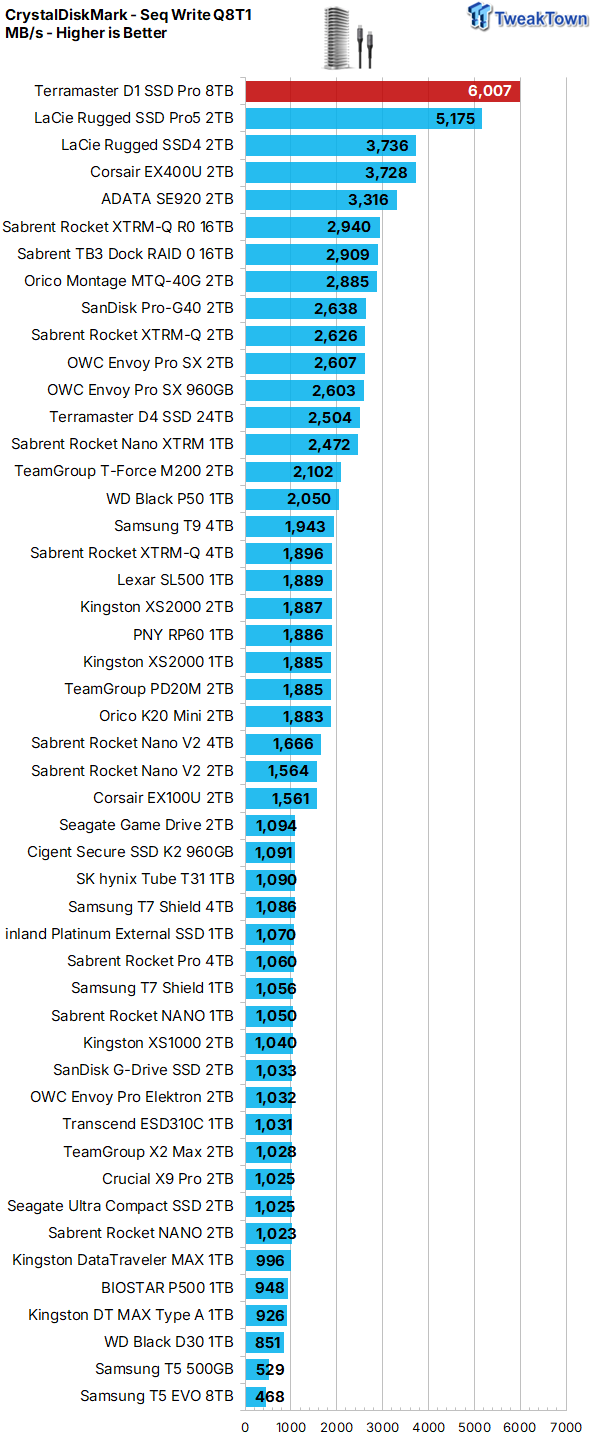
Utilizing the Thunderbolt 5 interface via Windows OS, we can't quite hit the speeds offered by Mac, but we are setting new lab records for any portable storage device, including our previous champion, the Thunderbolt 5-interfaced Rugged SSD Pro5. Granted, this is largely because we are employing a more powerful SSD than the LaCie device, but that's exactly the advantage of going the route of an enclosure with a user-supplied SSD.
ATTO
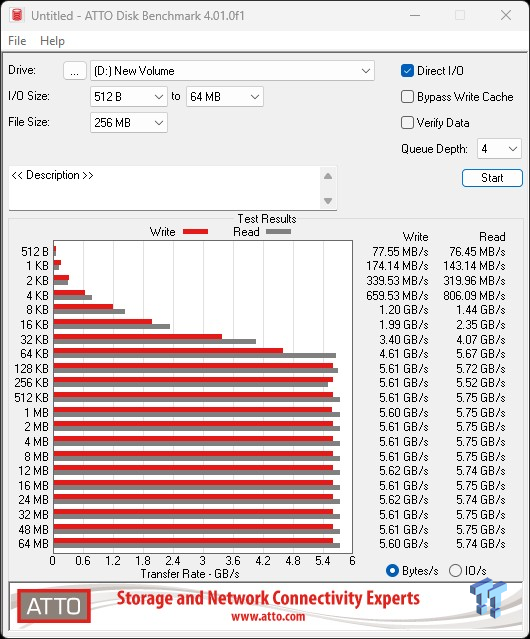
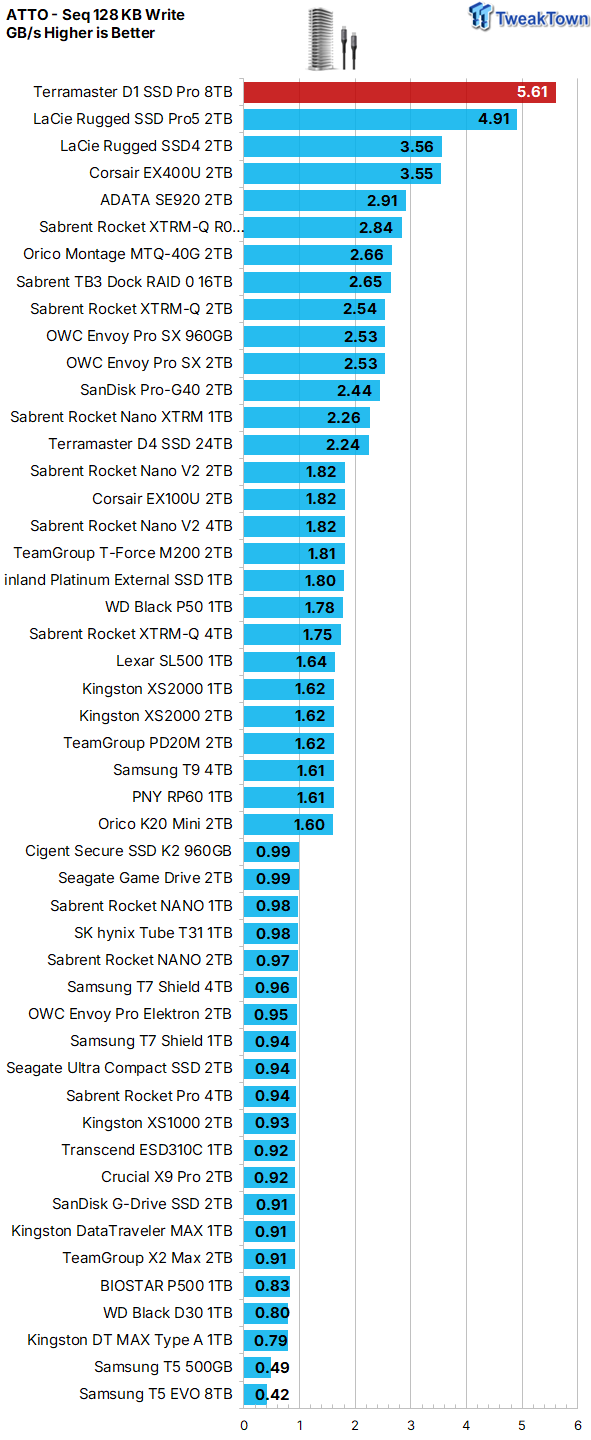
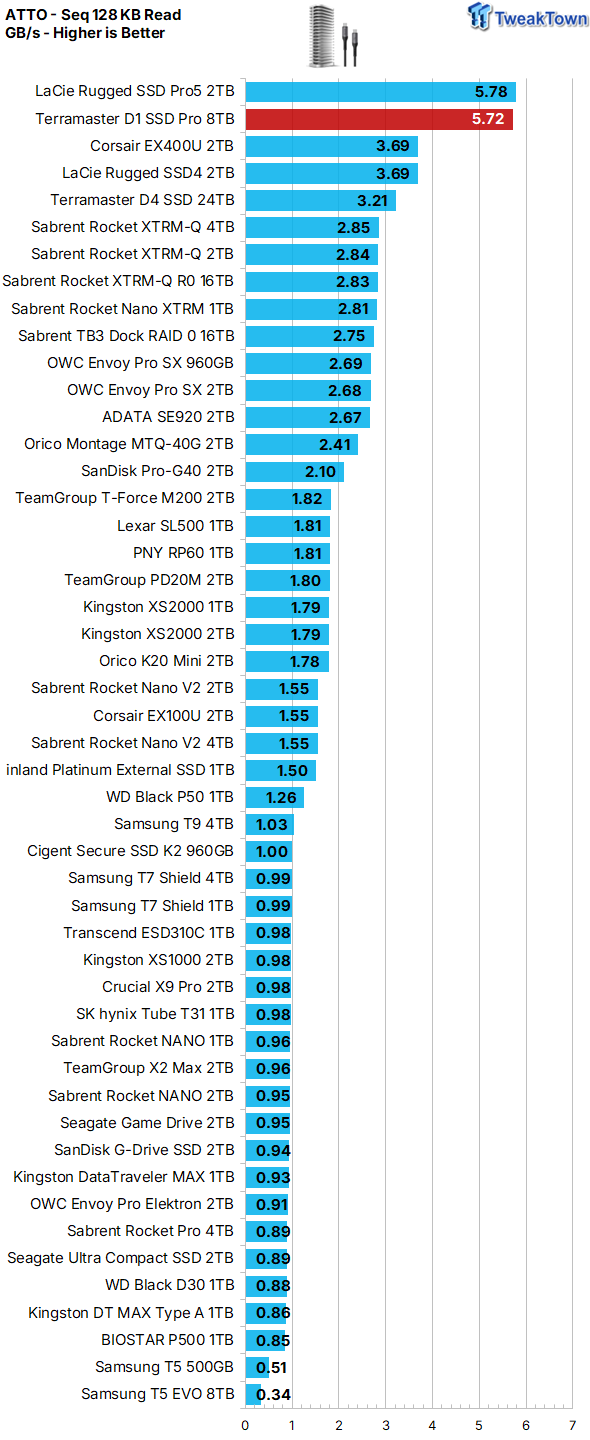
ATTO verifies our test subject as capable of delivering full sequential throughput at 128K transfers at the standard test queue depth of 4. This is exactly what we are looking for from any SSD, internal or portable. Impressive.
Blackmagic

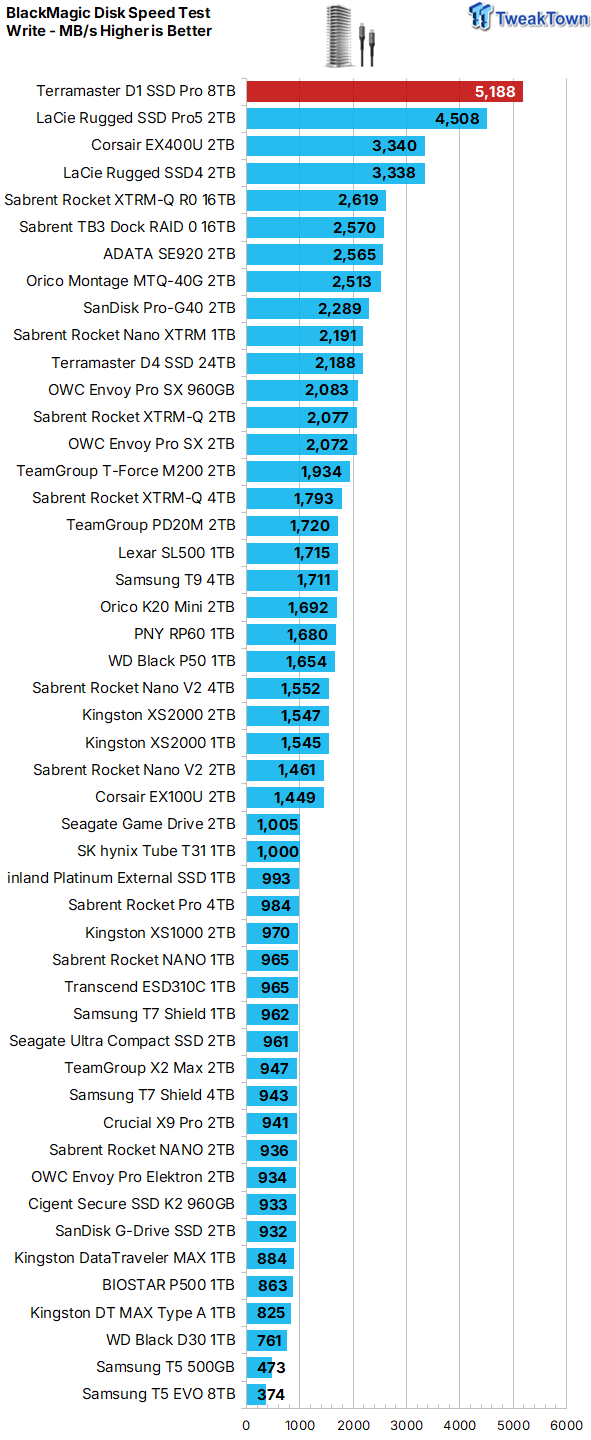
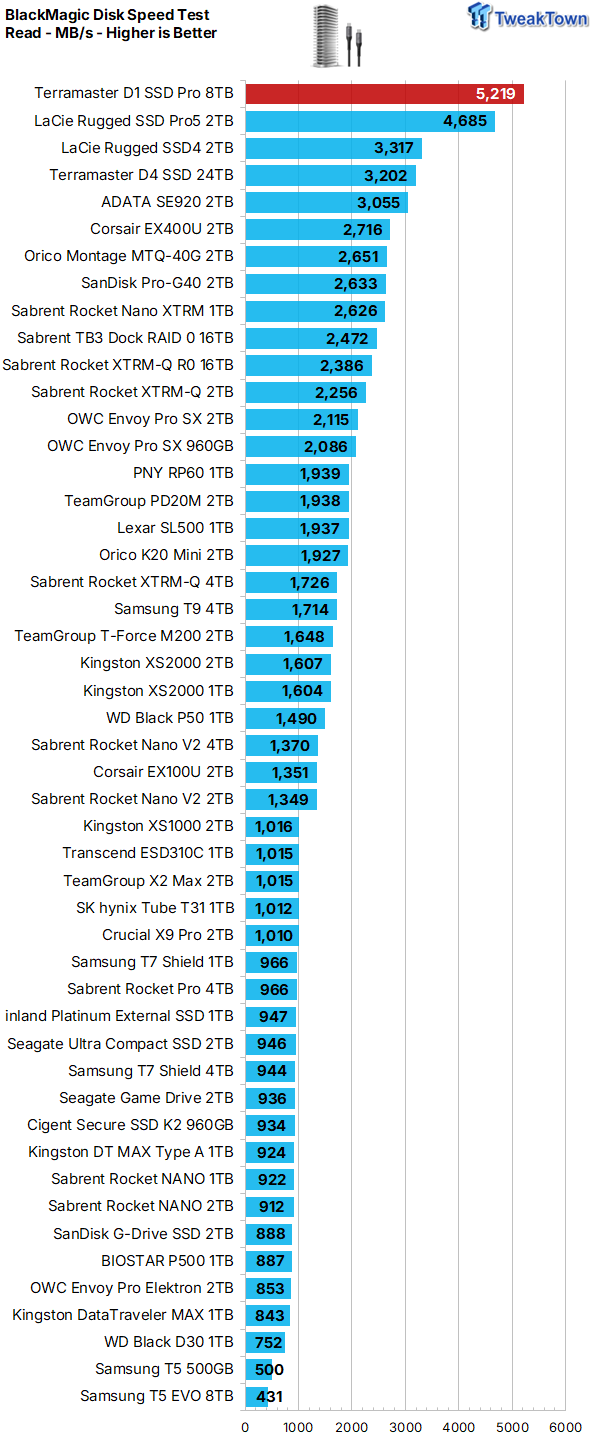
Is it the world's most powerful portable scratch disk for video? BlackMagic indicates that it can be, depending, of course, on the user-supplied SSD. Impressive.
Real-World Testing: PCMark 10, 3DMark SSD Gaming & Transfer Rates
PCMark 10 Data Drive Benchmark
The Data Drive Benchmark is designed to test drives that are used for storing files rather than applications. You can also use this test with NAS drives, USB sticks, memory cards, and other external storage devices.
The Data Drive Benchmark uses 3 traces, running 3 passes with each trace as follows:
- Copying 339 JPEG files, 2.37 GB in total, into the target drive (write test).
- Making a copy of the JPEG files (read-write test).
- Copying the JPEG files to another drive (read test).

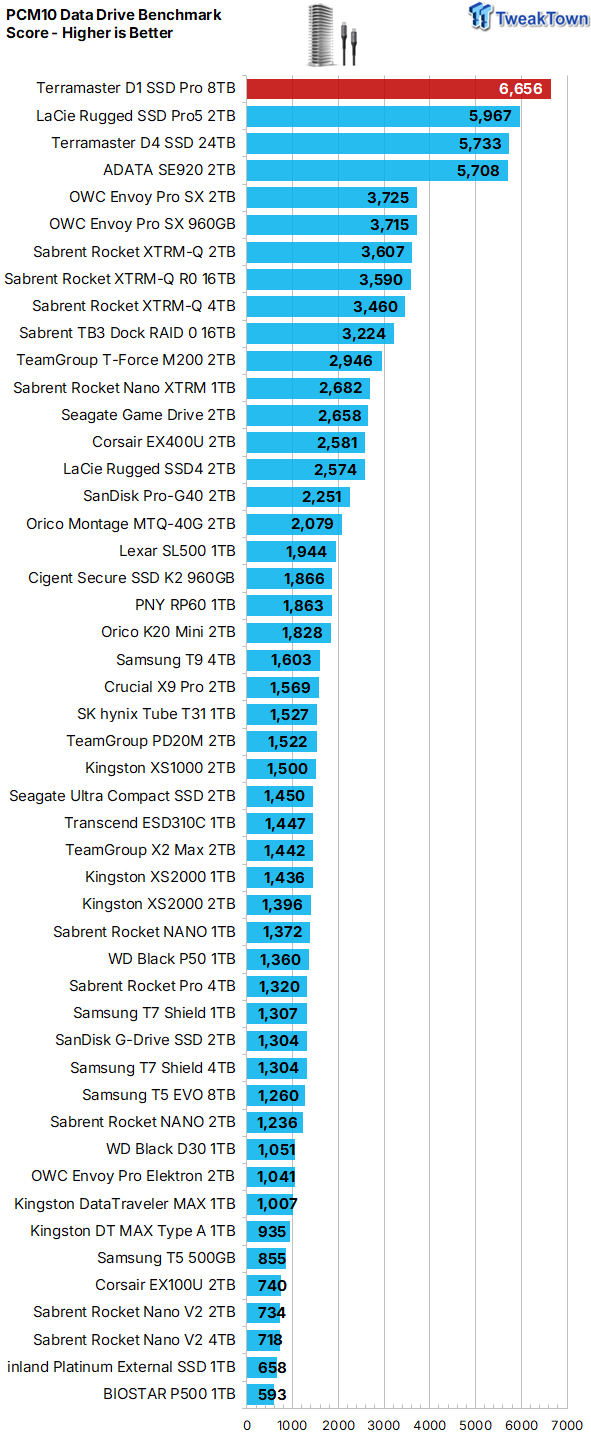
Again, another lab record falls with our test subject delivering a full 10% more than anything else of its kind that we've ever encountered.
3DMark SSD Gaming Test
UL's newest 3DMark SSD Gaming Test is the most comprehensive SSD gaming test ever devised. We consider it superior to testing against games themselves because, as a trace, it is much more consistent than variations that will occur between runs on the actual game itself. This test is, in fact, the same as running the actual game, just without the inconsistencies inherent to application testing. In short, we believe that this is the world's best way to test an SSDs gaming prowess and accurately compare it against competing SSDs. The 3DMark SSD Gaming Test measures and scores the following:
- Loading Battlefield V from launch to the main menu.
- Loading Call of Duty Black Ops 4 from launch to the main menu.
- Loading Overwatch from launch to the main menu.
- Recording a 1080p gameplay video at 60 FPS with OBS (Open Broadcaster Software) while playing Overwatch.
- Installing The Outer Worlds from the Epic Games Launcher.
- Saving game progress in The Outer Worlds.
- Copying the Steam folder for Counter-Strike Global Offensive from an external SSD to the system drive.

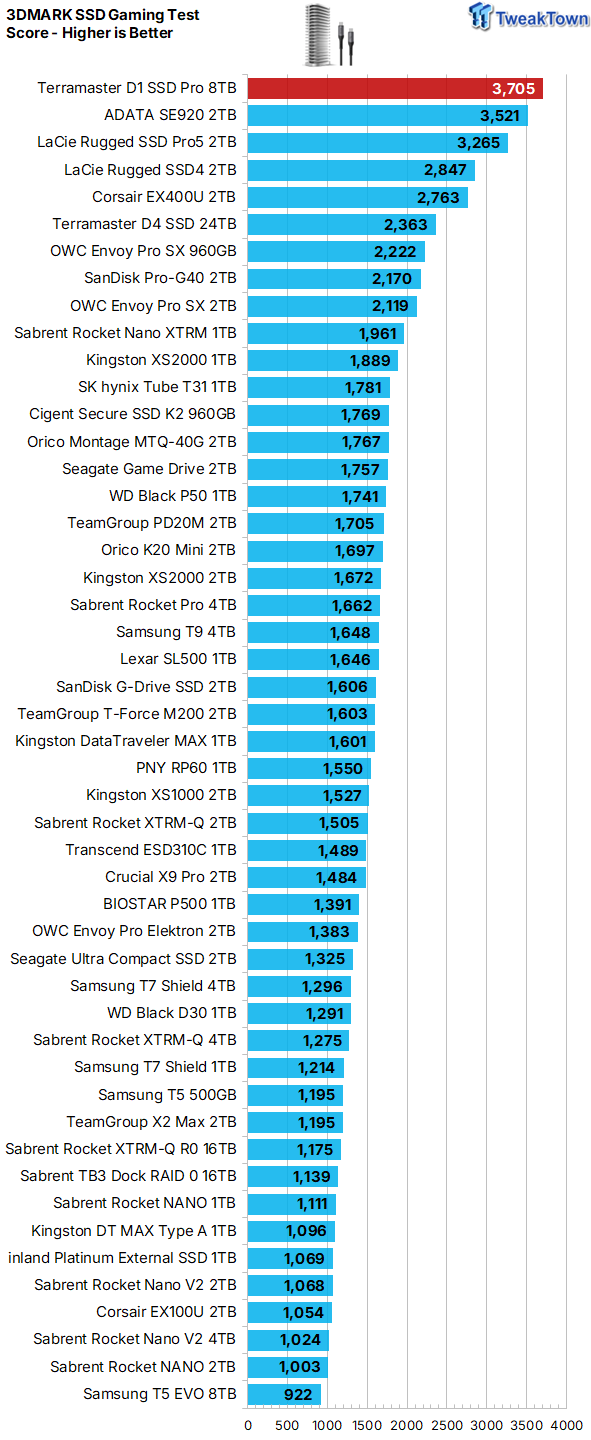
Gaming is a performance metric that matters to most DIY consumers, especially to the enthusiast crowd that TweakTown caters to. We are now including gaming performance as a part of our external SSD reviews, as using portable storage for gaming duties is very popular among avid gamers.
Ultra-portable, fully compatible storage is a nice complement to any console or PC gaming device.
This is indeed getting into internal SSD territory, which is amazing considering this is storage on the go.
DiskBench - Transfer Rates


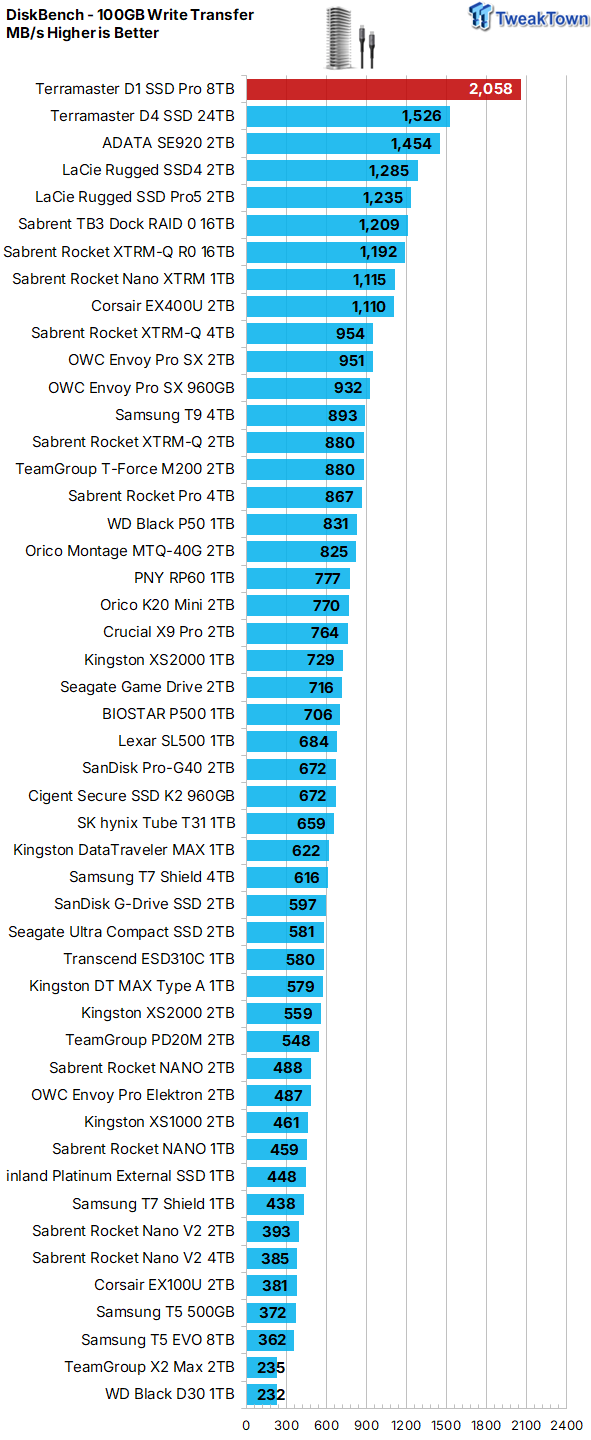
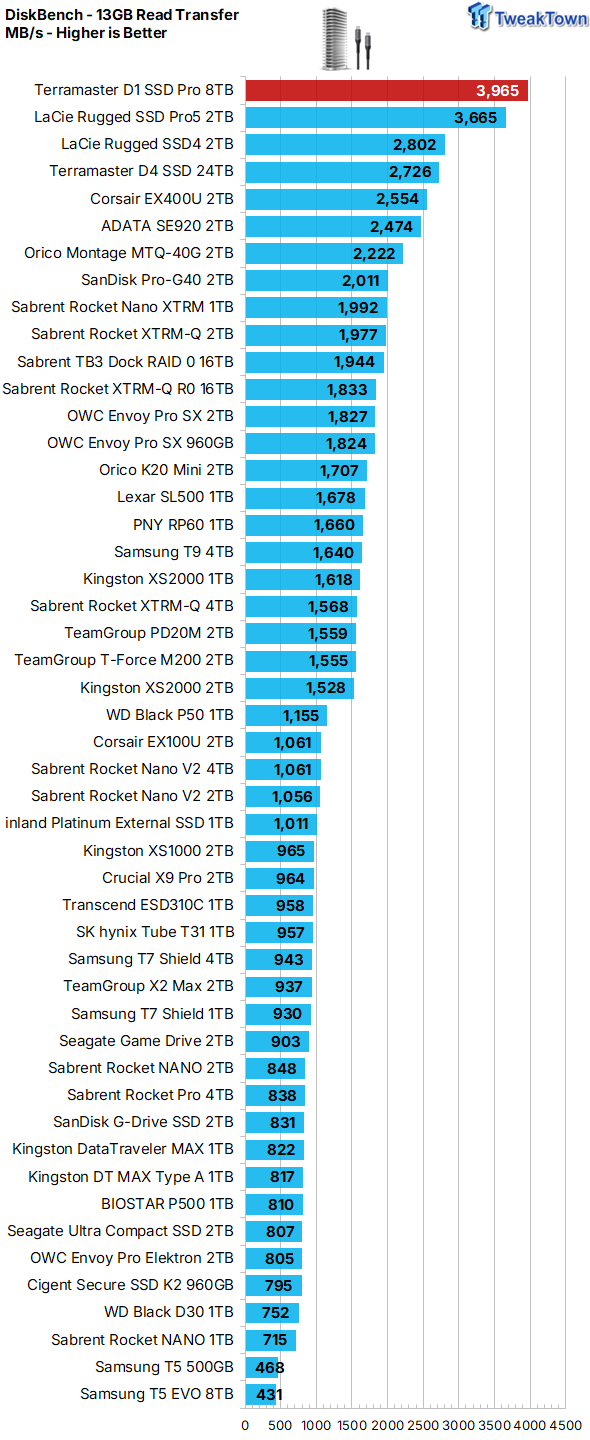
We brutalize our test subjects with our extremely hard-to-swallow 100GB data block. This data block is the same one we use for our internal SSD testing and is composed of more than 62K files. 100GB is probably right at the upper limit for a single transfer, so as we see it, this is a much more realistic test scenario than a sustained filling of the entire drive.
As expected, our Samsung 9100 Pro arrayed test subject again raises the bar over any of its kind that we've ever encountered.
Final Thoughts

It's rugged, powerful, cool-running, silent, and by far the fastest portable storage device we've ever encountered. As we see it, TERRAMASTER's D1 SSD Pro has the capability to be the world's most powerful portable scratch disk, making it a must-have for creative professionals and earning our highest award. Editor's Choice.


 ASUSTOR Lockerstor 2 Gen2+ AS6702T v2 NAS Review - Fast Performance
 Orico K20 Mini 2TB Magnetic Portable SSD Review - Ultra-Thin MagSafe Drive
 TERRAMASTER D4 SSD 4-Bay NVMe DAS Enclosure Review - Superior Portable DAS
 Micron 3610 2TB SSD Review - DRAMless QLC at 11,000 MB/s
 SK hynix Platinum P51 2TB SSD Review - A Powerful Gen5 Alternative
 Thermal Grizzly is now selling delidded Intel Core Ultra 7 270K Plus CPUs for enthusiasts
 Rumor: Next-gen Xbox may get disc-to-digital option to convert physical media into virtual games
 Sony expects PlayStation to break new profit records even while it invests in PS6
 PlayStation to deliver 32% returns this year, Sony predicts
 New Xbox cloud and Elite controllers leaked as Microsoft teases cloud-native games, tests free streaming
 Subnautica 2 is a mega hit with 2 million sales in 12 hours
 ASUS enters the memory business and launches its first 'ROG' DDR5 RAM modules
 Popular Chinese retailer JD briefly listed banned RTX 5090 and RTX PRO 6000 Blackwell GPUs
 Security researcher finds zero-day exploit that defeats Windows 11 BitLocker, calls it an insane 'backdoor' discovery
 AMD's FSR 4 coming to RDNA 2 could give the Xbox Series X a PS5 Pro-like upgrade
 PCCooler CPS RZ620M X CPU Cooler Review
 Memblaze PBlaze 7 7A40 Ocean 61.44TB Enterprise SSD Review - Oceans of QLC at 3.3 million IOPS
 MOZA SGP Sequential Sim Racing Shifter Review
 COLORFUL iGame GeForce RTX 5070 Ultra OC Review - When Style and Performance Meet
 GIGABYTE Z890 AORUS Elite WiFi7 Plus Motherboard Review - Right in the sweet spot
 PNY GeForce RTX 5080 Slim OC Review - A Compact 4K Powerhouse
 HP OmniBook 7 (Panther Lake) 16" Laptop Review
 ASUS ROG Strix X870E-E Gaming WiFi7 NEO - A Crosshair by any other name
 Cooler Master Cosmos Alpha Full-Tower Chassis Review
 Thrustmaster T598 Direct Axial Drive Force Feedback Racing Wheel Bundle Review
 Bluetooth Toggle Missing in Windows? Try These Fixes
 GPU Overclocking Basics in Windows 11: Safe Performance Gains Without the Guesswork
 GIGABYTE's new Ultimate OLED Gaming Monitor Bundle includes Xbox Game Pass
 I automated 5 annoying Windows maintenance tasks, and my PC basically runs itself
 How to Fix Windows 11 Black Screen on Boot or After Login
 The first 8 settings I disable on every fresh Windows 11 install in 2026
 Is Your Ethernet Performance Slower Than Wi-Fi? Here's How to Fix It
 MSI's Project Zero Delivers a Stunning Cable-Free Look to More Gamers
 How to Fix "We Couldn't Find a Fingerprint Sensor Compatible With Windows Hello" in Windows 11
 Why Is My Mouse Moving on Its Own? Here's How to Fix It