



Our Verdict
Pros
- Immersive and impressive audio
- Fantastic for gaming and listening to music
- 100mm planar magnetic drivers
- Supports USB and multiple wired options
- Premium build quality
Cons
- Bulky and heavy when compared to most gaming headsets
- No software customization
- Not really suitable for console gaming
- A lot of wires and cables to manage
Should you buy it?
AvoidConsiderShortlistBuyIntroduction & Specification Details and Close-up
Like the improved picture quality you can find on a high-end display, high-end audio gear presents the same thing, but for sound quality. However, when you enter the realm of audiophile headphones, more often than not, immersive and richly detailed sound takes precedent over everything else. This is why most audiophile headphones built for listening to music trade portability and versatility for designs that feature large drivers, a generally heavy but weight-balanced build, a wired interface for balanced sound, open-back earcups to enhance the soundstage, and a distinct lack of on-board audio hardware, with all processing handled via dedicated DACs, sound cards, or amplifiers.
Now, even though it's fundamentally similar, the gaming headset is a very different beast. In today's modern gaming era, low-latency wireless connectivity, Bluetooth support, a dedicated high-quality microphone, and a lightweight, comfortable, and durable build define the high-end market. Of course, sound quality and driver technology are still key components. But, everything from audio tuning through to support for surround sound and access to different presets makes a modern gaming headset a very different thing from a pair of over-ear audiophile headphones.
Developed in collaboration with audio experts at HIFIMAN, ASUS's new wired-only ROG Kithara Gaming Headset is a unique and interesting audio device that aims to combine two seemingly very different things - audiophile headphones and a gaming headset. Its custom-tuned 100mm HIFIMAN planar magnetic drivers and bulky physical design do make it feel more like the former (audiophile) than the latter (gaming), but its microphone and plug-and-play USB-C connectivity help make the latter a reality.

There's no denying that bringing this sort of audiophile design to the gaming space makes a notable difference in the immersion you feel when playing a game. After spending several weeks with the ROG Kithara Gaming Headset, it's clear that it's not for everyone, but if you value sound quality above all else, especially over things like wireless connectivity and portability, prepare to be impressed.
Specifications & Close Up

| Item | Details |
|---|---|
| Product Name | ASUS ROG Kithara Gaming Headset |
| Product Type | Wired Gaming Headset |
| Interface | USB-C, 3.5mm, Dual 3.5mm, Balanced (3.5mm, 4.4mm, 6.3mm) |
| Compatibility | PC, any 3.5mm capable device |
| Drivers | 100mm Planar Magnetic |
| Headphones Frequency Response | 8 - 55,000 Hz |
| Microphone Type | MEMS boom microphone |
| Microphone Frequency Response | 20 - 20,000 Hz |
| Surround | NA |
| Weight | 420 grams |
| Lighting | None |
| What's In The Box | ROG Kithara Gaming Headset, 1.8m Dual-3.5mm to Dual-3.5mm Boom Mic Cable, 1.8m Dual-3.5mm with 3-in-1 (3.5mm/6.3mm single-ended, 4.4mm balanced) plug cable, USB-C to Dual-3.5mm Adapter, 2 sets of Ear Cushion: 1 x Velour, 1 x Leatherette with Mesh Fabric, Frequency Response Measurement Card, Warranty Booklet, Quick Start Guide |


Kosta's Test System Specifications
Our Latest Headsets Review Coverage
- Logitech G325 LIGHTSPEED Wireless Gaming Headset Review - A Lightweight, Affordable, Winner
- SteelSeries Arctis Nova Elite Wireless Gaming Headset Review - Unbeatable Audiophile Sound
- Logitech Astro A20X LIGHTSPEED Wireless Gaming Headset Review - Impressive, But Familiar
- Turtle Beach Atlas 200 Headset Review - Affordable Audio for PS5 Gamers
- SteelSeries Arctis Nova 3X Wireless Gaming Headset Review - For PC and Console Gamers
| Item | Details |
|---|---|
| Motherboard | MSI MPG X870E Carbon WiFi (Buy at Amazon) |
| CPU | AMD Ryzen 7 9800X3D (Buy at Amazon) |
| GPU | NVIDIA GeForce RTX 5080 Founders Edition (default) (Buy at Amazon) |
| Display | MSI MAG 321UPX QD-OLED 4K 240Hz (Buy at Amazon) |
| Cooler | Corsair iCUE LINK TITAN 360 RX LCD Liquid CPU Cooler (Buy at Amazon) |
| RAM | Corsair VENGEANCE RGB 32GB (2x16GB) DDR5-6000 (Buy at Amazon) |
| SSD | Sandisk WD_BLACK SN8100 2TB PCIe Gen5 (Buy at Amazon) |
| Secondary SSD | Patriot Viper VP4300 Lite 4TB PCIe Gen4 (x2) (Buy at Amazon) |
| Power Supply | MSI MEG Ai1300P PCIE5 (Buy at Amazon) |
| Case | Corsair FRAME 4000D Modular Mid-Tower PC Case (Buy at Amazon) |
| Case Fans | Corsair iCUE LINK RX120 MAX RGB 120mm PWM Starter Kit (Buy at Amazon) |
| OS | Microsoft Windows 11 Pro (Buy at Amazon) |
| Today | 7 days ago | 30 days ago | ||
|---|---|---|---|---|
 | $299.99 USD | $299.99 USD | ||
 | - | $299.99 USD | ||
| $439.99 CAD | $439.99 CAD | ||
| $169.99 CAD | $191.98 CAD | ||
| $299.99 USD | $299.99 USD | ||
| $299.99 USD | $299.99 USD | ||
 | $569 | $569 | ||
* Prices last scanned 5/15/2026 at 2:44 pm CDT - prices may be inaccurate. As an Amazon Associate, we earn from qualifying purchases. We earn affiliate commission from any Newegg or PCCG sales. | ||||
Design & Software Support
Design
As a wired gaming headset, the ROG Kithara offers the sort of plug-and-play ease you expect, but its physical design adds complexity and versatility that help bridge the gap between an accessible gaming headset and an audiophile device that connects to a dedicated audio interface. At its core, there are two connection modes: a single 3.5mm interface for pure stereo listening and the traditional dual 3.5mm approach that separates audio and chat. The single 3.5mm interface can quickly convert to a balanced 4.4mm or 6.3mm connection with a simple swappable plug system. Likewise, the dual 3.5mm adapter doesn't require an audio interface, thanks to a USB-C adapter that presumably includes an integrated DAC.

There are a lot of cables included with the ROG Kithara Gaming Headset, more so than your traditional wired gaming headset. One reason is that the dual 3.5mm connection includes completely separate cables for audio and voice, so the boom microphone plugs into the right side, with the audio cable plugging into the left. This is the setup if you want to use the ROG Kithara as a gaming headset with chat capabilities, as this cable also includes inline controls for volume and microphone muting. Sure, this is a lot of talk about cables, but it helps set the scene for a gaming headset that's very different from just about every other gaming headset on the market.
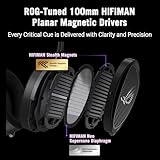
The ROG Kithara Gaming Headset is powered by two large 100mm HIFIMAN planar magnetic drivers, custom-tuned by ASUS's ROG team. Each ROG Kithara is calibrated and factory tested to ensure it matches the frequency profile of the reference design, which spans 8 Hz to 55,000 Hz. This is not only impressive for a gaming headset, but any pair of headphones, as it ensures the ROG Kithara can deliver the sort of detail you probably won't find elsewhere. Planar magnetic drivers are renowned for low distortion and delivering clean and crisp audio with an impressive bass response, and that's definitely the case here.

With large 100mm drivers, the ROG Kithara also features an open-back design that delivers a spacious, more natural sound. Most gaming headsets use a closed-back design, which offers natural noise cancellation while also isolating the audio and emphasizing low and high-end frequencies. The debate over which is better depends on the environment and use case, but for audiophile listening, open-back headphones are preferred by many because the unsealed, open design offers a wider stereo response that amplifies nuance and detail and is generally more comfortable for extended listening sessions. The downside is that anyone around you can also hear what you're listening to, and there's no real noise cancellation, so they're best suited to quiet, at-home listening.
As for ASUS's custom tuning, it definitely benefits gaming, music, and general entertainment, with plenty of low-end and mid-range detail alongside crisp, clear high-end frequencies. The overall sound is balanced and natural, which is what you want for an audiophile-like device. As for the physical design, the ROG Kithara's large oval earcups feature a durable metal outer shell paired with comfortable, soft cushions. This pairs with the headset's robust metal frame and adjustable headband made from leatherette and a thin layer of memory foam, providing even weight distribution and minimal pressure. However, weighing in at 420 grams, the ROG Kithara Gaming Headset is definitely heavy, and the large earcups make it the sort of headset that you can always 'feel' when it's sitting on your head.
The bulky size is also something that takes some getting used to, as you really need to secure the headband and place it in the right spot to avoid the earcups moving downward.
Software Support
Okay, so even with its USB-C interface for connecting the ROG Kithara Gaming Headset to a PC, there's no official software support for customization, which means no Armoury Crate or the new web-based Gear Link. This isn't unusual for a pair of headphones, but it is for a gaming headset. This means you're entirely reliant on the audio interface, Windows audio controls, and any third-party software for any customization.
Performance & Microphone Quality
Performance
For this review, we tested the ROG Kithara Gaming Headset using the included USB-C interface for gaming and the 6.3mm plug connected to a Universal Audio Volt 2 USB Audio Interface that supports 24-bit, 192 kHz audio, along with a studio-grade headphone amplifier for loud, clear monitoring when listening to music. That last bit is important because, even though the standard 3.5mm connection can connect directly to an Xbox or PlayStation controller, overall volume and audio presence suffer due to insufficient power for the large 100mm drivers.

As the ROG Kithara Gaming Headset features large planar magnetic drivers and a frequency response wider than most gaming headsets, we began testing by listening to a range of lossless music in both 16-bit and 24-bit high-res formats. And no matter the genre, whether it was bass-heavy electronic music or a high-quality studio recording of jazz musicians at the top of their game, it's safe to say that the ROG Kithara delivers a fantastic and impressive listening experience. Not only in terms of detail and how the sound is both warm and crisp when it needs to be, but also in the spatial and stereo awareness that comes from the large open-back design. The sound quality is also impressively distortion-free, especially at higher volumes.
The good news is that the ROG Kithara's impressive sound also applies to PC gaming, as its big soundstage, detail, and frequency response can really transform the audio experience. Playing games with impressive sound design and music, like DOOM Eternal, Diablo 4, Hades II, and Resident Evil Requiem, is fantastic here and definitely a step up from most pure gaming headsets. The overall sound might not be as bass-heavy as some gaming headsets, but that isn't a problem when you get this level of detail and such a large immersive stereo sound. The only issue is that the wired approach and bulky physical design of the headset is that it isn't quite as seamlessly comfortable or versatile as other premium gaming headsets, with most of the benefit coming from the sound quality.
Microphone Quality
The ROG Kithara ships with a MEMS boom microphone that supports the full frequency range of 20 to 20,000 Hz and a high SNR (signal-to-noise ratio) of 74dB. MEMS microphone technology is what you typically find in the smartphone space, and it's all about delivering clear, consistent chat with minimal distortion or other issues. This is worth highlighting because it means the voice chat or microphone quality of the ROG Kithara Gaming Headset is impressive for in-game chat, but the overall sound quality is nowhere near broadcast quality or the level of a dedicated microphone.
Final Thoughts
Even though it's got "gaming headset" right there in the name, the ROG Kithara Gaming Headset is an interesting release because it feels like a pair of audiophile-like headphones that can also be used for PC gaming. Its unique design and immersive audio experience definitely make it stand out from other gaming headsets. However, the unique design, bulky, heavy build, and wired-only approach won't appeal to many gamers. And when it comes to versatility, the ROG Kithara is best viewed as a PC gaming headset, as console compatibility doesn't quite mesh with its massive 100mm planar magnetic drivers, which benefit from proper amplification.

Ultimately, we're happy that ASUS has gone ahead and brought something fresh to the gaming audio space, as the simple fact is that, when it comes to pure listening, this type of headset design will, more often than not, come out on top. Sure, it's not wireless, and it's the sort of headset that comes alive when you plug it into a dedicated high-quality audio interface. Still, the fact that the USB mode unlocks a new level of sound and audio compared to just about any other gaming headset on the market makes it worth serious consideration.


 Logitech G325 LIGHTSPEED Wireless Gaming Headset Review - A Lightweight, Affordable, Winner
 Edifier NeoBuds Planar Review - Affordable Wireless Earbuds for Audiophiles
 SteelSeries Arctis Nova Elite Wireless Gaming Headset Review - Unbeatable Audiophile Sound
 Dell Pro Plus Earbuds EB525 Review - Productivity Buds
 Logitech Astro A20X LIGHTSPEED Wireless Gaming Headset Review - Impressive, But Familiar
 Thermal Grizzly is now selling delidded Intel Core Ultra 7 270K Plus CPUs for enthusiasts
 Rumor: Next-gen Xbox may get disc-to-digital option to convert physical media into virtual games
 Sony expects PlayStation to break new profit records even while it invests in PS6
 PlayStation to deliver 32% returns next year, Sony predicts
 New Xbox cloud and Elite controllers leaked as Microsoft teases cloud-native games, tests free streaming
 Subnautica 2 is a mega hit with 2 million sales in 12 hours
 ASUS enters the memory business and launches its first 'ROG' DDR5 RAM modules
 Popular Chinese retailer JD briefly listed banned RTX 5090 and RTX PRO 6000 Blackwell GPUs
 Security researcher finds zero-day exploit that defeats Windows 11 BitLocker, calls it an insane 'backdoor' discovery
 AMD's FSR 4 coming to RDNA 2 could give the Xbox Series X a PS5 Pro-like upgrade
 PCCooler CPS RZ620M X CPU Cooler Review
 Memblaze PBlaze 7 7A40 Ocean 61.44TB Enterprise SSD Review - Oceans of QLC at 3.3 million IOPS
 MOZA SGP Sequential Sim Racing Shifter Review
 COLORFUL iGame GeForce RTX 5070 Ultra OC Review - When Style and Performance Meet
 GIGABYTE Z890 AORUS Elite WiFi7 Plus Motherboard Review - Right in the sweet spot
 PNY GeForce RTX 5080 Slim OC Review - A Compact 4K Powerhouse
 HP OmniBook 7 (Panther Lake) 16" Laptop Review
 ASUS ROG Strix X870E-E Gaming WiFi7 NEO - A Crosshair by any other name
 Cooler Master Cosmos Alpha Full-Tower Chassis Review
 Thrustmaster T598 Direct Axial Drive Force Feedback Racing Wheel Bundle Review
 Bluetooth Toggle Missing in Windows? Try These Fixes
 GPU Overclocking Basics in Windows 11: Safe Performance Gains Without the Guesswork
 GIGABYTE's new Ultimate OLED Gaming Monitor Bundle includes Xbox Game Pass
 I automated 5 annoying Windows maintenance tasks, and my PC basically runs itself
 How to Fix Windows 11 Black Screen on Boot or After Login
 The first 8 settings I disable on every fresh Windows 11 install in 2026
 Is Your Ethernet Performance Slower Than Wi-Fi? Here's How to Fix It
 MSI's Project Zero Delivers a Stunning Cable-Free Look to More Gamers
 How to Fix "We Couldn't Find a Fingerprint Sensor Compatible With Windows Hello" in Windows 11
 Why Is My Mouse Moving on Its Own? Here's How to Fix It