




Our Verdict
Pros
- Excellent value
- Dual-mode
- Strong color performance
- Extremely versatile
Cons
- Not great build quality
- HDR is basically meaningless
Should you buy it?
AvoidConsiderShortlistBuyIntroduction & Specification Details and Close-up
The rise of dual-mode monitors has been one of the more interesting shifts in the gaming monitor market in recent memory, as buyers of this class of display dodge one of the hardest choices when buying a gaming monitor: Do I buy a high-resolution monitor with great image clarity for my cinematic games? Or, do I buy a high-refresh-rate, esports-focussed monitor for my competitive gaming titles?

The idea with dual mode monitors is enabling a user to simply hit a button and switch between a high-resolution mode, and a high refresh rate mode, with the prerogative being when a user jumps into a cinematic game they will use the high-resolution mode, and when they want to fire up a competitive title that benefits from high refresh rates, they will enable the corresponding mode on the monitor.
The AOC U27G4 is AOC's latest dual-mode monitor, and AOC has designed this monitor with the intention of affordability, as it's the cheapest dual-mode monitor available in its specification class (4K/160Hz & 1080p/320Hz). The U27G4 is typically priced between $250 and $320, depending on discounts. By comparison, GIGABYTE is offering a gaming monitor with the same core specifications for $379.99, while HKC has a comparable model for $259.99.
Specifications
| Item | Details |
|---|---|
| Model | AOC U27G4 |
| Size | 27-inch |
| Resolution | 3840 x 2160 / 1920 x 1080p |
| Pixels Per Inch (PPI) | 163 (4K) / 81 (1080p) |
| Panel Type | Fast IPS |
| Refresh Rate | 160Hz (4K) / 320Hz (1080p) |
| Response Time | 1ms (GTG) |
| Brightness | 350 cd/m² |
| Contrast Ratio | 1000:1 |
| Aspect Ratio | 16:9 |
| Viewing Angle | 178/178 |
| Color Coverage | NTSC 108% (CIE1976) / sRGB 127% (CIE1931) / DCI-P3 99% (CIE1976) |
| HDR Support | HDR 400 |
| Video Ports | 1x DisplayPort 1.4, 2x HDMI 2.1 |
| USB Ports | None |
| VESA Mounting | 100x100 |
| Adjustments | Tilt, Height, Swivel, Pivot |
| Warranty | 3-years |
Close-up


| Today | 7 days ago | 30 days ago | ||
|---|---|---|---|---|
 | $329.99 USD | $329.99 USD | ||
| $329.99 USD | $329.99 USD | ||
| $329.99 USD | $329.99 USD | ||
 | Check Price | Check Price | ||
* Prices last scanned 5/15/2026 at 5:41 pm CDT - prices may be inaccurate. As an Amazon Associate, we earn from qualifying purchases. We earn affiliate commission from any Newegg or PCCG sales. | ||||

Design
AOC has kept to its traditional physical design language with the U27G4, with cost efficiency being the forefront of the priorities. While cost-effectiveness is apparent, AOC has still managed to deliver a clean and functional aesthetic that will easily align with most modern gaming setups. Starting off with the finish, AOC has opted for the classic matte black that's paired with the brand's iconic red accents on the rear and stand.

The back panel features an angular design that gives the monitor a bit of personality without leaning too far into that heavy "gamer" aesthetic. The U27G4 doesn't feature any RGB lighting on the back, just simple AOC branding on one side of the backplate. The U27G4 has thin bezels on three sides, enabling users to maintain immersion while enhancing the clean, minimalist look.
Moving back to the stand, the UG27G4 is one of the better-value offerings, as many gaming monitors at this price point don't offer great adjustability. However, the U27G4 comes with height, tilt, swivel, and full-pivot support, enabling users a high level of flexibility when orienting the U27G4 for their specific setup. The stand itself does a great job of minimizing wobble, even when adjusting the panel. These ergonomics are more in line with monitors that cost $200+ more than the U27G4.
Our Latest Monitors Review Coverage
- KOORUI 34E6UC Gaming Monitor Review - UltraWide Gaming at 180Hz on a Budget
- MSI MPG 272QRF X36 Review - NVIDIA Pulsar Powers the Peak of 1440p Esports Gaming Monitors
- ASUS ROG Swift PG32UCDM3 Gaming Monitor Review - Unbeatable OLED Just Got Even Better
- ASUS ROG Strix Pulsar XG27AQNGV Review - The Bleeding Edge of 1440p Gaming Monitors is Here
- Aura Triple Boost 14 Pro Review - Triple Portable Monitors for $479

The cable management routing hole located near the base of the stand is quite an eyesore, and I believe this is entirely due to its off-center, or asymmetrical, seating. In my opinion, the hole should have faced directly toward the user, as it would better align with the clean, uniform design language.
Last point on the stand. I'm not sure whether it's more cost-effective to use a forked-feet stand, such as the one on the U27G4, or a standard square/rectangular stand, but I wish AOC had opted for the square base, as forked feet always take up more desk space than needed. The U27G4 is, unfortunately, no exception in this regard.

Although users who lack desk space can easily solve this problem with a desk/wall mount, which can be purchased from many online retailers for as little as $50, the U27G4 comes with 100x100 VESA mounting support.
Connectivity is also minimalist, as AOC has equipped the U27G4 with only 2x HDMI 2.1 ports, 1x DisplayPort 1.4, and a headphone jack. AOC has decided to drop a USB hub or even a single USB-C charging port to keep costs as low as possible.

I would have liked to see a single USB-C charging port, as that would have significantly improved the value proposition of the U27G4. I do understand what AOC is going for here. No bells and whistles, just the bare minimum of what a gamer needs.
Panel Breakdown
At the heart of the U27G4 is the 27-inch Fast IPS panel, which can switch between 3840 x 2160p (4K) at 160Hz and 1920 x 1080p (HD) at 320Hz. The idea behind these two modes is that users can switch between a higher pixel density and a slower refresh rate, and a higher refresh rate and a lower pixel density. In the 4K mode, the U27G4 has around 163 Pixels Per Inch (PPI), making for an intensely crisp image, while in 1080p mode, the PPI drops down to 81.

As for other performance metrics, AOC advertises fast response times of 0.5ms (GTG) in 4K mode, and 0.3ms in 1080p mode, which is ideal for competitive gaming titles that benefit from extremely fast response times. Other aspects of the U27G4 worth mentioning are the color performance and gamut, which are advertised as near 100% of the DCI-P3 color space and beyond the standard sRGB.
These results indicate that U27G4 produces a nice, saturated, vibrant image that will work well across all modern games, media consumption, and other workflows such as word processing or even image/video editing.

HDR performance isn't fantastic, but that is something we would come to expect at this price point. The U27G4 can reach around 350-400 nits of brightness, which is enough for standard SDR content but not enough to deliver much HDR, especially given the lack of local dimming zones and an exceptionally high peak brightness.
Performance
So, how does the AOC U27G4 fare in what matters most - games? Firstly, with every monitor I test, I like to include several different genres of games to see where the monitor performs best and to hopefully give a gamer an idea of what their experience will be like if they play their favorite type of game on the display under the spotlight.

For the AOC U27G4, I tested the following games: League of Legends, Apex Legends, Overwatch 2, Black Myth: Wukong, Cyberpunk 2077, The Witcher 3, God of War Ragnarok, Valorant, DOOM: The Dark Ages, Age of Mythology: Retold, Borderlands 4, Counter-Strike, and Battlefield 6.
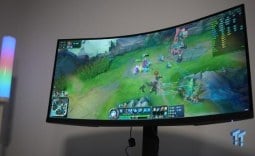
The U27G4 performed well across all of the above titles, with each mode delivering impressive results in its applicable title. For example, I used the 1080p mode when testing League of Legends, Apex Legends, Overwatch 2, Valorant, DOOM: The Dark Ages, Counter-Strike, and Battlefield 6, as all of those titles benefit from high-refresh-rate gaming.

Playing Cyberpunk 2077, The Witcher 3, God of War Ragnarok, and Black Myth: Wukong, I used the 4K mode because none of those games reach very high FPS and benefit more from higher image fidelity. My experience was generally good across both modes, with the 1080p mode significantly improving responsiveness and display fluidity, and the 4K mode increasing visual fidelity to a level that maintained immersion.
The flexibility between these two modes highlighted that the U27G4 is truly a jack-of-all-trades, master of none gaming monitor, as its performance across all games was consistent. Given its price and performance, the U27G4 is one of the strongest performance-per-dollar options in its class.
Final Thoughts
So, should you buy an AOC U27G4? Someone who should be adding the U27G4 to their shortlist of potential upgrades should be first to make the jump to 4K gaming, but also regularly plays competitive games.

The ideal buyer of the U27G4 is someone who spends 50% of their gaming time in competitive, high refresh rate-benefiting titles, which are your Counter-Strikes, Overwatch 2's, and League of Legends, and spends the other 50% in slower cinematic titles that benefit from higher image clarity.
While the U27G4 isn't the absolute in any singular aspect of a gaming monitor, it offers an extremely honed value proposition that encompasses speed, versatility, and fantastic performance - all for an affordable price. If I were looking for a jack-of-all-trades gaming monitor and didn't want to break the bank, I'd absolutely keep an eye on the U27G4.


 KOORUI 34E6UC Gaming Monitor Review - UltraWide Gaming at 180Hz on a Budget
 MSI MPG 272QRF X36 Review - NVIDIA Pulsar Powers the Peak of 1440p Esports Gaming Monitors
 ASUS ROG Swift PG32UCDM3 Gaming Monitor Review - Unbeatable OLED Just Got Even Better
 ASUS ROG Strix Pulsar XG27AQNGV Review - The Bleeding Edge of 1440p Gaming Monitors is Here
 Aura Triple Boost 14 Pro Review - Triple Portable Monitors for $479
 Thermal Grizzly is now selling delidded Intel Core Ultra 7 270K Plus CPUs for enthusiasts
 Rumor: Next-gen Xbox may get disc-to-digital option to convert physical media into virtual games
 Sony expects PlayStation to break new profit records even while it invests in PS6
 PlayStation to deliver 32% returns next year, Sony predicts
 New Xbox cloud and Elite controllers leaked as Microsoft teases cloud-native games, tests free streaming
 Subnautica 2 is a mega hit with 2 million sales in 12 hours
 ASUS enters the memory business and launches its first 'ROG' DDR5 RAM modules
 Popular Chinese retailer JD briefly listed banned RTX 5090 and RTX PRO 6000 Blackwell GPUs
 Security researcher finds zero-day exploit that defeats Windows 11 BitLocker, calls it an insane 'backdoor' discovery
 AMD's FSR 4 coming to RDNA 2 could give the Xbox Series X a PS5 Pro-like upgrade
 PCCooler CPS RZ620M X CPU Cooler Review
 Memblaze PBlaze 7 7A40 Ocean 61.44TB Enterprise SSD Review - Oceans of QLC at 3.3 million IOPS
 MOZA SGP Sequential Sim Racing Shifter Review
 COLORFUL iGame GeForce RTX 5070 Ultra OC Review - When Style and Performance Meet
 GIGABYTE Z890 AORUS Elite WiFi7 Plus Motherboard Review - Right in the sweet spot
 PNY GeForce RTX 5080 Slim OC Review - A Compact 4K Powerhouse
 HP OmniBook 7 (Panther Lake) 16" Laptop Review
 ASUS ROG Strix X870E-E Gaming WiFi7 NEO - A Crosshair by any other name
 Cooler Master Cosmos Alpha Full-Tower Chassis Review
 Thrustmaster T598 Direct Axial Drive Force Feedback Racing Wheel Bundle Review
 Bluetooth Toggle Missing in Windows? Try These Fixes
 GPU Overclocking Basics in Windows 11: Safe Performance Gains Without the Guesswork
 GIGABYTE's new Ultimate OLED Gaming Monitor Bundle includes Xbox Game Pass
 I automated 5 annoying Windows maintenance tasks, and my PC basically runs itself
 How to Fix Windows 11 Black Screen on Boot or After Login
 The first 8 settings I disable on every fresh Windows 11 install in 2026
 Is Your Ethernet Performance Slower Than Wi-Fi? Here's How to Fix It
 MSI's Project Zero Delivers a Stunning Cable-Free Look to More Gamers
 How to Fix "We Couldn't Find a Fingerprint Sensor Compatible With Windows Hello" in Windows 11
 Why Is My Mouse Moving on Its Own? Here's How to Fix It